Sizing a Gear Drive with the Gear Drive Selector
When you know what your application has to do but not which gearbox does it, the Gear Drive Selector works the problem backwards. You describe the application — motor, ratio, how it's coupled and how it's mounted — and it returns sized drives that meet those requirements, ranked, with a route straight into the configurator and a quote.
This walkthrough uses a worked example: a 10 HP electric motor, a 5:1 reduction, direct coupled, foot mounted.
Sign in first. The selector itself is open to anyone, but requesting a quote at the end needs an account.
Step 1 — Find the selector
Go to Resources → Tools & Resources → Product Selectors.
The landing page lists every selection tool Regal Rexnord publishes — bulk material handling, cam followers, backstops, cooling tower drivetrains and more. The chips across the top (Industrial Chain, Bearings, Clutches and Brakes, Electric Motors, Gearing, Conveyor Technology, Couplings) filter the list by product family.
Some tools are marked Login Required. If you're signed in, they behave like any other.
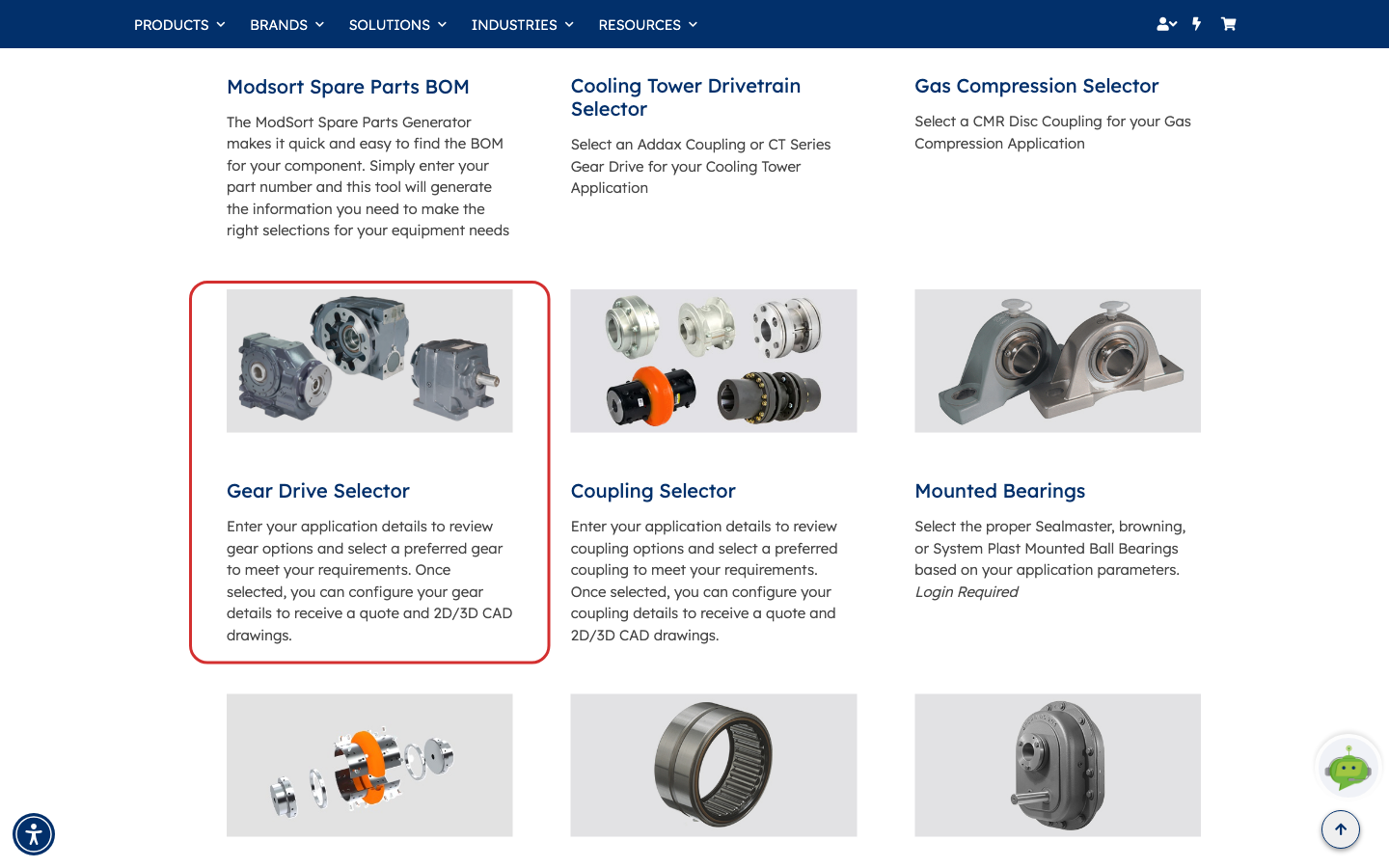
Pick Gear Drive Selector — it's under Gearing.
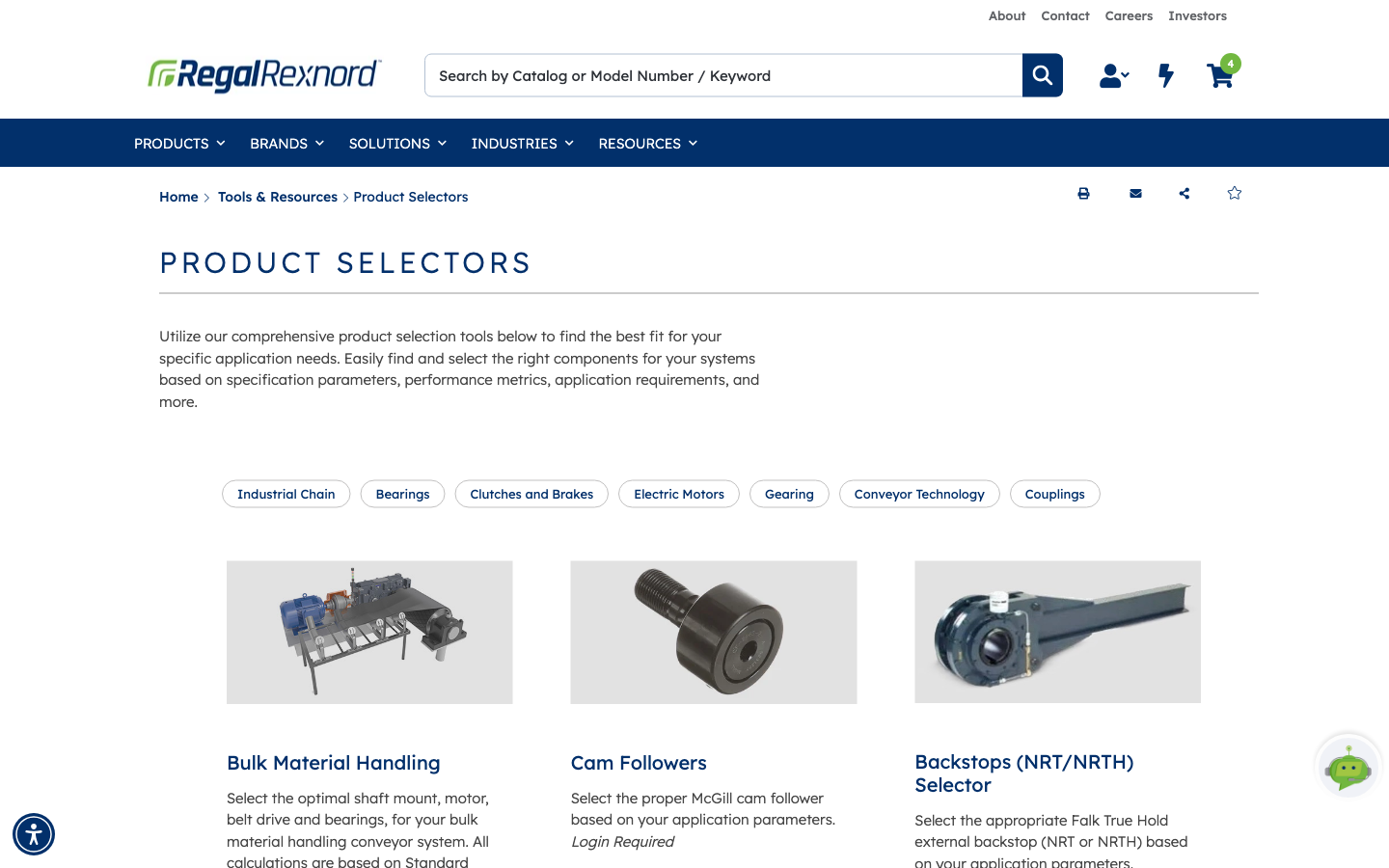
Each card carries a short description of what the tool does. The Gear Drive Selector card sits in the third row, between Modsort Spare Parts BOM and Coupling Selector.
Step 2 — Get your bearings on the Inputs tab
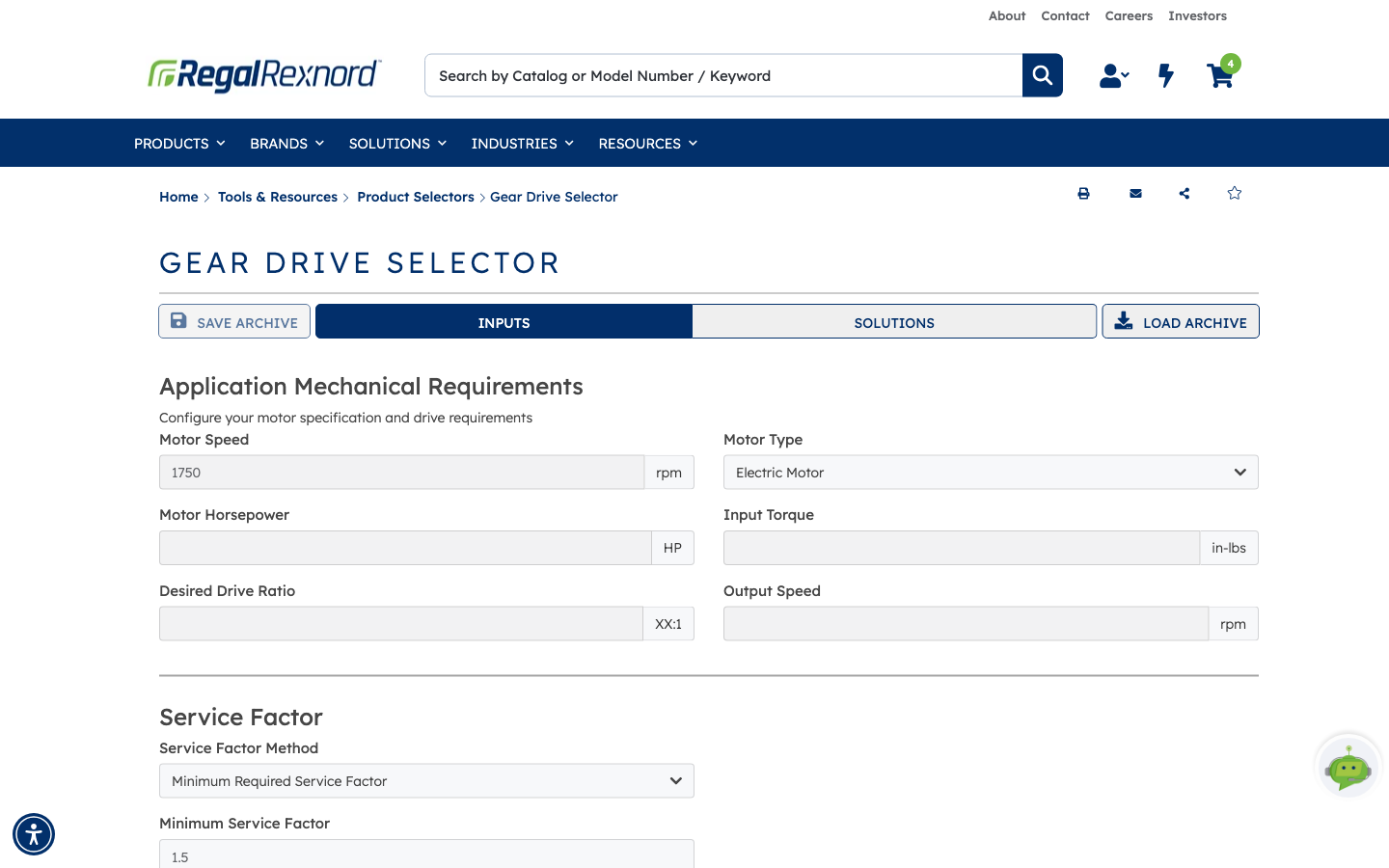
The selector opens on the INPUTS tab. Four controls sit across the top of the page:
- INPUTS and SOLUTIONS — the two halves of the tool. SOLUTIONS stays empty until you run it.
- SAVE ARCHIVE / LOAD ARCHIVE — save a set of inputs to a file and reload it later. Useful if you size similar applications repeatedly, or want a colleague to check your assumptions.
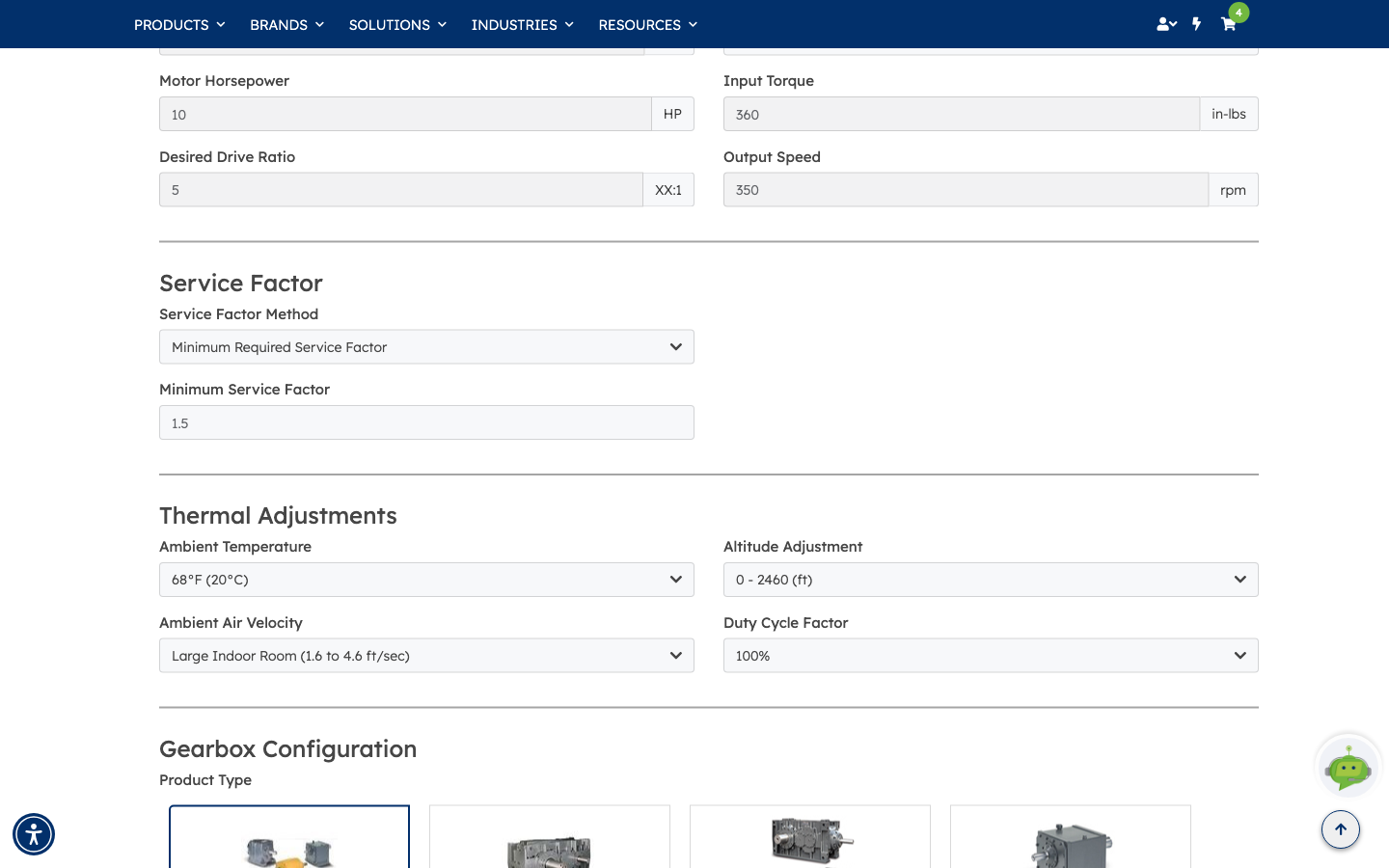
The form itself is grouped into sections, and most fields arrive pre-filled with sensible defaults — Motor Speed 1750 rpm, Minimum Service Factor 1.5, a 68°F ambient, sea level, 100% duty cycle. You only need to change what's actually different about your application.
Step 3 — Describe the application
Under Application Mechanical Requirements, enter:
- Motor Horsepower —
10 - Desired Drive Ratio —
5(the field is labelled XX:1, so this is 5:1)
Watch Input Torque and Output Speed as you type: the tool derives them from what you've entered and fills them in for you. In the example, 10 HP at 1750 rpm gives 360 in-lbs of input torque, and a 5:1 reduction gives 350 rpm out. If you'd rather work from torque or output speed, type those instead and the tool solves the other way round.
The sections below are there when you need them:
- Service Factor — how much margin to size in. Leave Minimum Required Service Factor at 1.5, or switch the method to AGMA Class or Application/Industry to have it derived from what the drive is actually doing.
- Thermal Adjustments — ambient temperature, altitude, air movement and duty cycle. These feed the thermal rating, which is what decides whether the drive needs cooling.
Step 4 — Say how it's built and mounted
Scroll on to Gearbox Configuration.
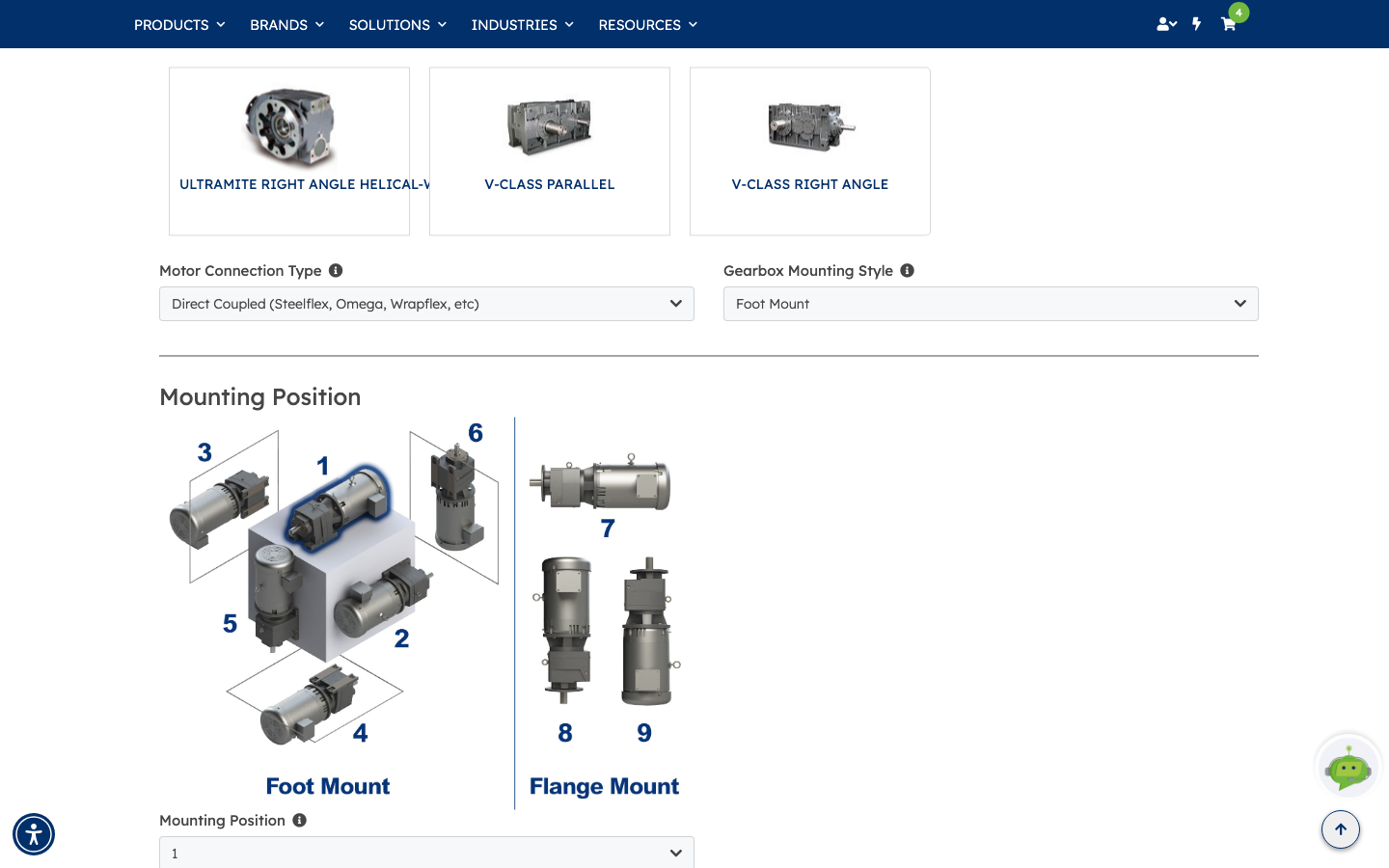
Product Type is a row of illustrated tiles. All Concentric Drives, All Parallel Drives and All Right Angle Drives search a whole shaft arrangement; the tiles after them (UltraMax, Planetgear, Quadrive, Concentric Ultramite, V-Class and so on) narrow it to one family. Leaving it on the broad option gives the selector the most to work with.
Then set the two drop-downs:
- Motor Connection Type —
Direct Coupled (Steelflex, Omega, Wrapflex, etc) - Gearbox Mounting Style —
Foot Mount
Below them, Mounting Position shows the numbered orientation diagram — positions 1 to 6 for foot mount, 7 to 9 for flange mount — so you can tell the tool which way up the drive sits.
The small ⓘ next to each label opens an explanation of the options. They're worth reading if you're unsure: the one on Motor Connection Type, for instance, explains what a solid input shaft assumes about motor speed.
A word of warning: these two drop-downs reset if you switch to the SOLUTIONS tab and come back. Set them last, immediately before you solve, and re-check them if you've been moving between tabs.
Step 5 — Solve, and read the results
Click SOLVE at the bottom of the INPUTS tab. (SOLVE is the button that runs the selector — clicking the SOLUTIONS tab on its own only switches the view.)
The tool moves you to SOLUTIONS and returns sized drives as cards: one badged Recommended, the rest Alternate Option. Each card carries the model and shaft arrangement plus the numbers you need to compare them:
- Product Number — the model, with
XXwhere the configurator still has choices to make. - Rating and Service Factor — the achieved margin against your minimum. Anything at or above what you asked for is a pass; in the example all three clear 1.5.
- Drive Ratio and Output RPM — the actual reduction, which lands near your target rather than exactly on it, because ratios come in discrete steps. 5.04:1 and 5.64:1 both bracket the 5:1 asked for.
- Cooling Required — whether your thermal inputs force a fan or cooling package.
- Lead Time and Price Factor — relative cost against the recommended option, so
1.02is two percent more than the baseline.
That combination is what makes the comparison useful: a slightly higher service factor usually costs a little more, and the table lets you see the trade directly.
If you get A drive that meets the application requirements is currently unavailable from this selector, your requirements are outside what this tool covers. Loosen something — a broader Product Type, a lower minimum service factor — or use the expert line quoted in the message.
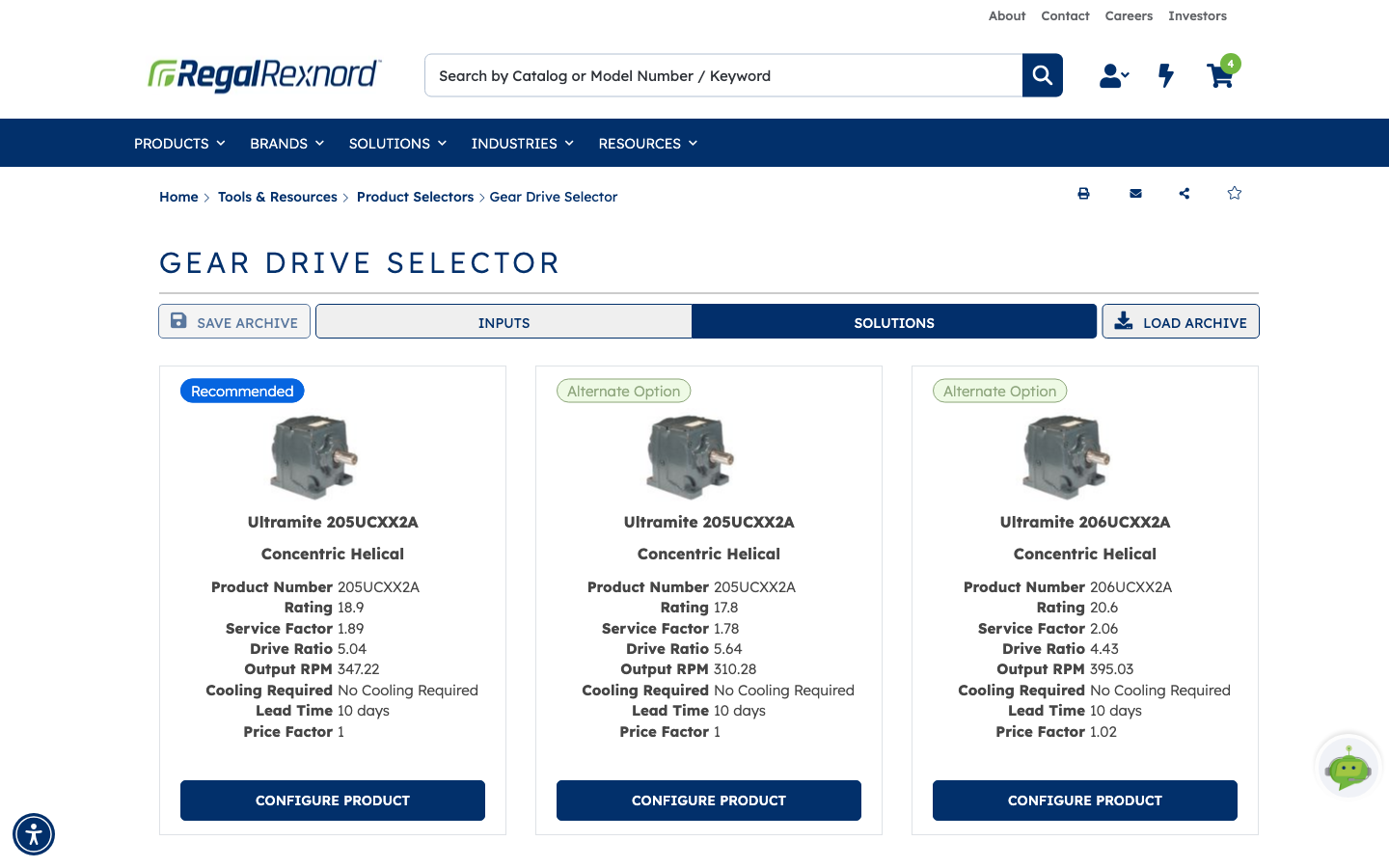
Side by side, the three returned options compare like this:
| Recommended | Alternate | Alternate | |
|---|---|---|---|
| Product | Ultramite 205UCXX2A | Ultramite 205UCXX2A | Ultramite 206UCXX2A |
| Type | Concentric Helical | Concentric Helical | Concentric Helical |
| Rating | 18.9 | 17.8 | 20.6 |
| Service Factor | 1.89 | 1.78 | 2.06 |
| Drive Ratio | 5.04 | 5.64 | 4.43 |
| Output RPM | 347.22 | 310.28 | 395.03 |
| Cooling Required | None | None | None |
| Lead Time | 10 days | 10 days | 10 days |
| Price Factor | 1 | 1 | 1.02 |
Step 6 — Configure and request a quote
CONFIGURE PRODUCT on any card hands the selected model to the matching configurator — for the example that's the Ultramite UC Inline/Concentric Gear Drive Configurator — with your selections already applied.
The configurator resolves the remaining build options, the ones the XX in the product number stands
for: low speed shaft, seal types, and so on. Options that don't apply to your size are locked with an
explanation rather than hidden, so you can see why a choice isn't open to you. Working through it
produces a complete model number.
From there, REQUEST QUOTE opens a quote request with the configured drive already listed and your contact details pre-filled from your account. Review it, add anything the sales team needs to know, and submit.
What you've done
You've gone from an application description — horsepower, ratio, coupling and mounting — to a shortlist of properly sized gear drives you can compare on service factor, lead time and relative cost, and on into a configured model and a quote.
Worth remembering
- SOLVE runs the selector. The SOLUTIONS tab only shows you the last result.
- Motor Connection Type and Gearbox Mounting Style clear when you move between tabs. Check them before you solve.
- Ratios come in steps, so the returned Drive Ratio brackets your target rather than matching it. Check the resulting Output RPM is something your application can live with.
- SAVE ARCHIVE is the quickest way to revisit a sizing, or hand it to someone else to sanity-check.